Logical Functions
Learn how to use Excel's
logical functions such as the IF, AND and OR function.
|
Functions
|
What it Does
|
|
AND
|
Returns TRUE if all its arguments
are TRUE
|
|
IF
|
Specifies a logical test to
perform
|
|
NOT
|
Reverses the logic of its argument
|
|
OR
|
Returns TRUE if any argument is
TRUE
|
|
New in Excel 2007
|
|
|
IFERROR
|
Returns a specified value if the
formula results in an error otherwise returns the result of the formula
|
If Function
Basic Description
The Excel IF
function tests a user-defined condition and returns one result if the condition
is true, and another result if the condition is false.
The syntax of
the function is :
IF( logical_test, value_if_true, value_if_false )
where the
arguments are as follows:
|
logical_test
|
-
|
The user-defined condition that is to be tested and evaluated as
either TRUE or FALSE
|
|
value_if_true
|
-
|
The result that is to be returned from the function if the
supplied logical_test evaluates to TRUE
|
|
value_if_false
|
-
|
The result that is to be returned from the function if the
supplied logical_test evaluates to FALSE
|
The IF function checks
whether a condition is met, and returns one value if TRUE and another value if
FALSE.
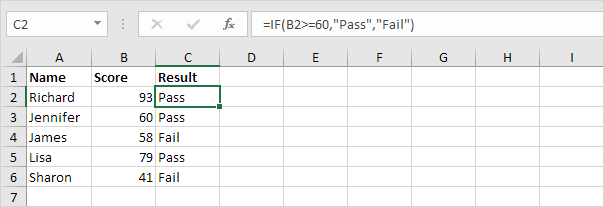
Select cell C2 and enter the following function.
The IF function returns Correct because the value in cell A1 is higher than 10.
Tip:
You cannot use an IF formula to change the color of the font
or of the cell's background based on a value (criteria). To do so you will use "
Conditional Formatting" .
=> When you develop a condition for an IF formula it is not
case sensitive.
And Function
The AND Function returns TRUE if all conditions
are true and returns FALSE if any of the conditions are false.
Select cell D2 and enter the following formula.
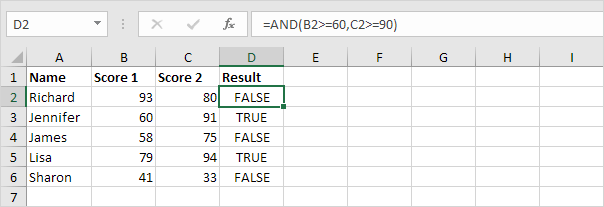
The AND function returns FALSE because the value in cell
B2 is not higher than 5. As a result the IF function returns Incorrect.
Or Function
The OR function returns TRUE if any of the
conditions are TRUE and returns FALSE if all conditions are false.
Select cell E2 and enter the following formula.

The OR function returns TRUE because the value in cell A1
is higher than 10. As a result the IF function returns Correct.
General note: the AND
and OR function can check up to 255 conditions.
NOT function
Reverses the value of its argument. Use NOT when you want
to make sure a value is not equal to one particular value.
Syntax :NOT(logical)
The NOT function syntax has the following arguments:
Logical Required.
A value or expression that can be evaluated to TRUE or FALSE.
|
Formula
|
Description
|
Result
|
|
=NOT(FALSE)
|
Reverses FALSE
|
TRUE
|
|
=NOT(1+1=2)
|
Reverses an equation that evaluates to TRUE
|
FALSE
|


No comments:
Post a Comment